
Kamis, 31 Maret 2011

Kamis, 16 Desember 2010
Windows XP Not Genuine


Solution 1
Lauch Windows Task Manager.
End wgatray.exe process in Task Manager.
Restart Windows XP in Safe Mode.
Delete WgaTray.exe from c:\Windows\System32.
Delete WgaTray.exe from c:\Windows\System32\dllcache.
Lauch RegEdit.
Browse to the following location:
HKEY_LOCAL_MACHINE\SOFTWARE\Microsoft\
Windows NT\CurrentVersion\Winlogon\Notify
Delete the folder ‘WgaLogon’ and all its contents
Reboot Windows XP.
Note: With this method, you may be prompted to install WGA Notifications again which can still be unselected.
Solution 2
1-Launch Task manager
2-End process WGAtray.exe
3-Quickly restart in safe mode.
4-Click start, then Run. Type regedit and click ok.
5-Click HKEY_LOCAL_MACHINE
6-Click Software, microsoft, windowsNT, currentversion, winlogon, notify.
7-On the right hand side find folder WGAlogon and delete it and all of its components.
8-Restart in normal mode.
9-Go to c:\windows\system32 and delete WGAtray.exe file.
10-Next to it should be WGAlogon.dll, delete this too.
11-Delete from recycling bin and reboot.
This should have solved the problem but i advise switching your automatic updates to
“Notify me but dont automatically download or install them”. This should advise you if your computer tries to download WGA again.
Solution 3
For windows XP SP3 users try this method
1 Lauch RegEdit.
2 Browse to the following location:
HKEY_LOCAL_MACHINE\SOFTWARE\Microsoft\
Windows NT\CurrentVersion\Winlogon\Notify
3 Delete the folder ‘WgaLogon’ and all its contents
4 Reboot Windows XP.
Solution 4
Disabling and renaming the files ‘WgaLogon.dll’ and ‘WgaTray.exe’ in C:\WINDOWS\system32 folder by using the program Unlocker seems to get rid of all the nags/popups.
Solution 5
Another alternative suggest that three files are installed Windows XP System Folder for WGA:
\WINDOWS\system32\WgaLogon.dll
\WINDOWS\system32\WgaTray.exe
\WINDOWS\system32\LegitCheckControl.dll
The wgatray.exe process makes the check for genuine windows software. If WgaLogon.dll is denied execution right, that WinLogon is unable to call it to check on Windows validity and display notification package at boot, and since WgaLogon is also responsible for running and maintaining WgaTray.exe, no more tray popups either.
To change and disable the execute bit of WgaLogon.dll:
Turn off Simple File Sharing in Tools -> Folder Options -> View tab.
Right click WgaLogon.dll in Windows Explorer and open the Security Tab.
Click Advanced button.
Uncheck the Inherit box at the bottom.
Click the Copy button.
Click OK.
Go through each listed user/group and remove the “Read & Execute” permission for WgaLogon.dll, leaving the “Read” permission as-is.
Click OK to apply the permission changes.
Close the file properties dialog.
Restart the computer.
Turn “Use simple file sharing” on (optional).
Jumat, 08 Oktober 2010
Kaspersky Trial Resetter 2011
http://rapidshare.com/#!download|806|416746892|Kaspersky__2011__Trial_Resetter_3.2.0.0.released.ws.rar|2372
Selasa, 31 Agustus 2010
Wrx HTPC


Core i3 530/Zalman CNPS9500 Led/ Gigabyte H55N USB3/ 2x2GB Patriot DDR3 1600Mhz/MSI GTX275 Lightning 1792MB/ WDC 1.5TB Green/ Lite on DVDRW/ Corsair VX550Watt/ Aopen G326 Red/ Sony Bravia 26" / Logitech Z Cinema / Logitech K350 Unified / A4tech X7 Spliter Cell Edition
Jumat, 27 Agustus 2010
TP Link WN722N @ Ubuntu 10.04
This last weekend and I have to play a little bit with Ubuntu 10.4 and my new wireless USB adapter TP-LINK model TL-WN722N. The Ubuntu 10.4 has not recognized the adapter, so I had to ask Google how to make that works. I’ve tried many things, one was using diswrapper with Windows Driver, but did not work. After another attempts I found a solution, and I decide to write here.
The first step is to get the firmware, you can download it from the following link:
http://git.kernel.org/?p=linux/kernel/git/dwmw2/linux-firmware.git;a=blob_plain;f=ar9271.fw;hb=35b308409dc18991ec833c24972fd631c9f479a1
After the download you need to copy it to /dev/firmware directory:
sudo cp -r ~/Downloads/ar9271.fw /lib/firmware
Now we need to get the latest version of compact wireless, you can get it from the link below:
http://wireless.kernel.org/download/compat-wireless-2.6/
I got the file compat-wireless-2.6.tar.bz2
After the download you will need to uncompress the file:
tar -xjvf compact-wireless-2.6.tar.bz2
Now, it’s time to compile the driver. Enter in directory:
cd compat-wireless-2010-05-23/
and type the command:
sudo make
After the compilation, you can install the driver using the command:
sudo make install
Now, you need to unload the old driver and load the new one:
sudo make unload
sudo make load ath9k_htc
After loading the new driver you must reboot you system and once the system rebooted you will be able to use your wireless connection.
I hope this tip will be useful for you.
See you!!
Reference: http://www.theinquirer.net/inquirer/news/1603562/canonical-releases-ubuntu-linux-04-lts
The first step is to get the firmware, you can download it from the following link:
http://git.kernel.org/?p=linux/kernel/git/dwmw2/linux-firmware.git;a=blob_plain;f=ar9271.fw;hb=35b308409dc18991ec833c24972fd631c9f479a1
After the download you need to copy it to /dev/firmware directory:
sudo cp -r ~/Downloads/ar9271.fw /lib/firmware
Now we need to get the latest version of compact wireless, you can get it from the link below:
http://wireless.kernel.org/download/compat-wireless-2.6/
I got the file compat-wireless-2.6.tar.bz2
After the download you will need to uncompress the file:
tar -xjvf compact-wireless-2.6.tar.bz2
Now, it’s time to compile the driver. Enter in directory:
cd compat-wireless-2010-05-23/
and type the command:
sudo make
After the compilation, you can install the driver using the command:
sudo make install
Now, you need to unload the old driver and load the new one:
sudo make unload
sudo make load ath9k_htc
After loading the new driver you must reboot you system and once the system rebooted you will be able to use your wireless connection.
I hope this tip will be useful for you.
See you!!
Reference: http://www.theinquirer.net/inquirer/news/1603562/canonical-releases-ubuntu-linux-04-lts
Rabu, 25 Agustus 2010
Memperbaiki WINDOWS\SYSTEM32\CONFIG\SYSTEM CORRUPT pada windowsXP
Memperbaiki file system windows yang rusak/corrupt tanpa instal ulang
jika pada saat booting windows muncul tulisan WINDOWS\SYSTEM32\CONFIG\SYSTEM CORRUPT
sellect R to repair
atau WINDOWS\SYSTEM32\CONFIG\SOFTWARE CORRUPT
maka anda tidak perlu menginstal ulang perangkat lunak (windows) yang ad di komputer anda… mungkin lebih efektifnya jika anda mencoba cara berikut ini…
yang perlu d persiapkan…
- punya CD bootable windows XP
- segelas kopi + rokok jika di perlukan… he,,,he,,,
OK kita menuju TKP….
1. pastikan bahwa booting dari CD. (kalo belum silahkan set di bios)
–masukan CD bottable XP, dan booting dari CD tersebut…
–pada opsi r (repair) yang pertama tekan r
–tekan # 1 (biasanya)
–jika d minta, masukkan password administrator
–setelah muncul tulisan C:\WINDOWS>
ketik: CD SYSTEM32 (enter)
kemudian muncul tulisan C:\WINDOWS\SYSTEM32>
ketik: CD CONFIG (enter)
kemudian muncul tulisan C:\WINDOWS\SYSTEM32\CONFIG>
–ketik: ren system system (enter)
__jika sudah Ketik: copy\windows\repair\system (enter)
maka file yang rusak atau corrupt akan di ganti…
ketik : exit
keluarkan CD restart, byak..byak…. InsaAlloh windows kembali normal
begitu juga untuk masalah SOFTWARE corrupt: WINDOWS\SYSTEM32\CONFIG\SOFTWARE CORRUPT
anda tinggal mengganti tulisan SYSTEM menjadi SOFWARE
Minggu, 22 Agustus 2010
Printer USB To Printer LPT @ XP
Secara garis besar untuk dapat menggunakan printer USB sebagai printer LPT adalah dengan menganggap printer USB tersebut sebagai printer jaringan ( dishare ). dengan menggunakan perintah net use lpt1, printer seakan2 sebagai printer USB
Langkah2 detail sebagai berikut :
================== sharing printer =======================
1. Pastikan driver printer sudah terinstall dengan benar dan bisa print
2. Cek nama komputer, klik kanan my computer, properties, computer name. lihat pada full computer name misalnya "FerrariOne"
3. start, printer and faxes
4. klik kanan pada printer yg mau disharing, misalnya "Epson LX300", sharing.
5. If understand ( misalnya belum pernah sharing ), just enable file sharing
6. Share This Printer
7. Kasih nama share saran ga pake spasi misalnya "LX300"
========= Mengaktifkan Printer USB sebagai LPT ===============
1. Masuk my computer, masuk ke drive c
2. klik kanan di sembarang tempat new, text document
3. kasih nama misalnya printer.bat bukan printer.bat.txt
4. edit printer.bat
5. ketik : net use lpt1: \\ferrarione\lx300 ====> net use lpt1: \\[nama computer]\[nama share printer]
6. save printer.bat
7. copykan file printer.bat ke startup windows( di start,all program,start up)
8. restart computer
setelah langkah2 tersebut dilakukan maka printer usb dapat digunakan u/ mengeprint program2 lama yg menggunakan port LPT
Langkah2 detail sebagai berikut :
================== sharing printer =======================
1. Pastikan driver printer sudah terinstall dengan benar dan bisa print
2. Cek nama komputer, klik kanan my computer, properties, computer name. lihat pada full computer name misalnya "FerrariOne"
3. start, printer and faxes
4. klik kanan pada printer yg mau disharing, misalnya "Epson LX300", sharing.
5. If understand ( misalnya belum pernah sharing ), just enable file sharing
6. Share This Printer
7. Kasih nama share saran ga pake spasi misalnya "LX300"
========= Mengaktifkan Printer USB sebagai LPT ===============
1. Masuk my computer, masuk ke drive c
2. klik kanan di sembarang tempat new, text document
3. kasih nama misalnya printer.bat bukan printer.bat.txt
4. edit printer.bat
5. ketik : net use lpt1: \\ferrarione\lx300 ====> net use lpt1: \\[nama computer]\[nama share printer]
6. save printer.bat
7. copykan file printer.bat ke startup windows( di start,all program,start up)
8. restart computer
setelah langkah2 tersebut dilakukan maka printer usb dapat digunakan u/ mengeprint program2 lama yg menggunakan port LPT
Rabu, 23 Juni 2010
Sharing Folder Windows 7 Like XP
Preparation :
1. start
2. control panel
3. network and internet
4. network and sharing centre
5. change advanced sharing settings
6. @Home Or Work :
a. Turn on network discovery
b. Turn on file and printer sharing
c. turn on sharing so anyone with network access can read and write files in public folders
d. use 128 bit encryption
e. turn of password protected sharing
7. save changes
Share a folder / drive : ( sample share a drive D )
1. My Computer
2. Right click on D
3. Share With
4. Advanced Sharing
5. Advanced Sharing
6. Share This Folder
7. Permission
 8. @ Everyone, Full Control
9. Ok, Apply, Close All Windows
(change full control of folder )
10. Security
11. Edit
12. Add
13. Type Everyone @ Enter the object names to select
14. Check Names
15. Ok
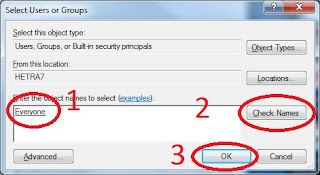
Now you can access sharing on other computer, if asking for user name just type "Everyone" without a password
1. start
2. control panel
3. network and internet
4. network and sharing centre
5. change advanced sharing settings
6. @Home Or Work :
a. Turn on network discovery
b. Turn on file and printer sharing
c. turn on sharing so anyone with network access can read and write files in public folders
d. use 128 bit encryption
e. turn of password protected sharing
7. save changes
Share a folder / drive : ( sample share a drive D )
1. My Computer
2. Right click on D
3. Share With
4. Advanced Sharing
5. Advanced Sharing
6. Share This Folder
7. Permission
 8. @ Everyone, Full Control
(change full control of folder )
10. Security
11. Edit
12. Add
13. Type Everyone @ Enter the object names to select
14. Check Names
15. Ok

Now you can access sharing on other computer, if asking for user name just type "Everyone" without a password
Selasa, 11 Mei 2010
Update Firmware Modem ADSL Belkin F5D764-4 For Wireless Problem
Belkin Modem ADSL + Router Wifi G mengalami gejala keanehan soal wifi, u/ memperbaikinya cukup dengan mengupdate firmwarenya menjadi 1005 yg dibuat third party. Bisa didownload di :
http://bohausiaw.blogspot.com/2009/10/belkin-f5d7634ak4a-issue-solved.html
ubah juga channel wifi menjadi 3 / 6 / 11, defaultnya auto
http://bohausiaw.blogspot.com/2009/10/belkin-f5d7634ak4a-issue-solved.html
ubah juga channel wifi menjadi 3 / 6 / 11, defaultnya auto
Minggu, 11 April 2010
Scan Disk Mac
Problem is that most of the time it says that the disk doesn't need repair and thus the error remains.
If you have the same problem, you can to the following to sort it out:
1. Restart your Mac.
2. As soon as it turns on, even before you hear it go bong, hold down Cmd+S.
3. The system will boot showing a lot of text. If it doesn't and you see the Apple logo, you've waited too long. Reboot and try again.
4. When at the prompt type fsck -f. If changes are successfully made it will repeat the process then say "Modifications have been made".
5. Then simply type in reboot and you should be able to partition your drive successfully.
If you have the same problem, you can to the following to sort it out:
1. Restart your Mac.
2. As soon as it turns on, even before you hear it go bong, hold down Cmd+S.
3. The system will boot showing a lot of text. If it doesn't and you see the Apple logo, you've waited too long. Reboot and try again.
4. When at the prompt type fsck -f. If changes are successfully made it will repeat the process then say "Modifications have been made".
5. Then simply type in reboot and you should be able to partition your drive successfully.
Kamis, 11 Februari 2010
MOTOROLA Q9H
Setting, Connection, GPRS, New :
Description = halo (atau terserah mo diisi apa)
Connects to = The Internet
Access Point = internet
User name = kosongin
Password = kosongin
Authentification Type = None
Primari DNS = 0.0.0.0
Secondary DNS = 0.0.0.0
IP address : 10.1.89.130
Setting, Connection, Proxy, New :
Description = halo wap (atau terserah mo diisi apa)
Connects from = The Internet
Connects to = WAP Network
Proxy (name : port) = 10.1.89.130:8000
Type = HTTP
User name = kosongin
Password = kosongin
Kalo hard reset buat Q9H (hape dalam posisi off)
Code:
1 + * + power
atau
E + Z + power
speed hack
Spoiler for 3:
Spoiler for a:
HKLM\System\GDI\GLYPHCACHE >>> limit
Code:
edit dword datanya : dari 16384 to 32768
Spoiler for b:
HKLM\System\StorageManager\FATFS >>> CacheSize
Code:
edit dword datanya : menjadi 4096
HKCU\ControlPanel\Keybd >>> DefaultLayout
ubah string valuenya : dari 00000407 menjadi 00000409
Description = halo (atau terserah mo diisi apa)
Connects to = The Internet
Access Point = internet
User name = kosongin
Password = kosongin
Authentification Type = None
Primari DNS = 0.0.0.0
Secondary DNS = 0.0.0.0
IP address : 10.1.89.130
Setting, Connection, Proxy, New :
Description = halo wap (atau terserah mo diisi apa)
Connects from = The Internet
Connects to = WAP Network
Proxy (name : port) = 10.1.89.130:8000
Type = HTTP
User name = kosongin
Password = kosongin
Kalo hard reset buat Q9H (hape dalam posisi off)
Code:
1 + * + power
atau
E + Z + power
speed hack
Spoiler for 3:
Spoiler for a:
HKLM\System\GDI\GLYPHCACHE >>> limit
Code:
edit dword datanya : dari 16384 to 32768
Spoiler for b:
HKLM\System\StorageManager\FATFS >>> CacheSize
Code:
edit dword datanya : menjadi 4096
HKCU\ControlPanel\Keybd >>> DefaultLayout
ubah string valuenya : dari 00000407 menjadi 00000409
Rabu, 03 Februari 2010
Kaspersky 2010 Trial Resetter
kaspersky merupakan anti virus dan internet security paling tangguh yg pernah aq pake, oleh karena itu meskipun susah untuk ditaklukkan ( crack ) tapi tetap saja diusahakan mencari berbagai macam cara.
pada sebelumnya versi beta masih bisa dipakai,namun sekarang sudah tidak bisa oleh karena itu diakali dengan mereset lisensi ke trial
u/ mendownload dari Rapid Shit :
http://rapidshare.com/files/250453588/Kaspersky_Resetter_v2.3.0.0.rar
jgn lupa matikan self defence + kasperksy sebelum menjalankan trial resetter

1. klik kanan di logo kaspersky di kanan bawah taskbar
2. setting
3. option
4. hilangkan centang enable self defence
5. ok
6. klik kanan logo kasperky
7. exit
8. klik kanan pada file yg sudah didownload
9. extract here
10. jalankan file resetter 2.3.exe
11. start
12. active trial ( harus ada koneksi internet )

simpan baik2 file rar ini karena jika tidak filenya akan dihapus oleh kaspersky krn dianggap virus !!!!!
pada sebelumnya versi beta masih bisa dipakai,namun sekarang sudah tidak bisa oleh karena itu diakali dengan mereset lisensi ke trial
u/ mendownload dari Rapid Shit :
http://rapidshare.com/files/250453588/Kaspersky_Resetter_v2.3.0.0.rar
jgn lupa matikan self defence + kasperksy sebelum menjalankan trial resetter

1. klik kanan di logo kaspersky di kanan bawah taskbar
2. setting
3. option
4. hilangkan centang enable self defence
5. ok
6. klik kanan logo kasperky
7. exit
8. klik kanan pada file yg sudah didownload
9. extract here
10. jalankan file resetter 2.3.exe
11. start
12. active trial ( harus ada koneksi internet )

simpan baik2 file rar ini karena jika tidak filenya akan dihapus oleh kaspersky krn dianggap virus !!!!!
Ternyata pabrik LCD terbesar cuman 3
While there are many different manufacturers of LCD monitors, the panels themselves are actually only manufactured by a relatively small selection of companies. The three main manufacturers tend to be Samsung, AU Optronics and LG.Display (previously LG.Philips), but there are also a range of other companies like CMO and CPT which are used widely in the market.
http://www.tftcentral.co.uk/articles/panel_parts.htm
http://www.tftcentral.co.uk/articles/panel_parts.htm
Minggu, 31 Januari 2010
Recovery Aspire One Trouble
Many Acer systems come with the ability to press ALT+F10 to kick off the Acer Recovery applications from a special hidden recovery partition. Sometimes this won’t work and there can be a number of reasons.
1. D2D Recovery is “Disabled” in the BIOS (Main menu).
FIX: Enabled it and try pressing ALT+F10 again as the computer boots.
2. The Acer hidden recovery partition (PQSERVICE) has been removed or damaged. If the disk drive is a replacement drive then you won’t have this partition.
FIX: Unless you have previously imaged the PQSERVICE partition it will not be possible to use D2D recovery. You will need to restore from the Acer Recovery CD/DVD.
3. You have converted the FAT32 partition on the hard drives into NTFS. Acer D2D recovery won’t be available if you perform this conversion. Ironic that NTFS is a more desirable disk format to use but Acer won’t support this in their systems!
FIX: Restore your system from the recovery CD/DVD media.
4. The special Acer Master Boot Record (MBR) has become corrupt or has been overwritten with an non Acer MBR. As long as the PQSERVICE partition is there or you can get your hands on a couple of Acer service files for your model, then you can remake the special Acer MBR. Let’s cover how this is done.
1. Disable D2D recovery in the BIOS. Can be found in the “Main” menu section. Save the BIOS settings and exit.
2. Log into Windows with an “administrator” level account.
3. Download ParTEDIT32.ZIP (registration required for download).
4. Extract PTEDIT32.EXE from the zip archive and run it.
5. Identify the PQSERVICE partition by its type or size. It is likely to be 12 or another custom value and is likely to be reasonably small in comparison to the other normal partitions – see the example below from a working factory default Acer. Click to see the image full size. PQSERVICE being edited by PTEDIT32
Change the type to “07″ (Installable File System NTFS, HPFS) and “Save Changes”.
6. Reboot the computer and login with an “administrator” level account.
7. You should then be able to open up a command prompt and navigate to the PQSERVICE drive.
8. Enter the following command at the command prompt:
mbrwrdos.exe install rtmbr.bin
- You may have to search for these files and change into the relevant directory.
Note: This step writes the Acer MBR, with mbrwrdos.exe and rtmbr.bin being the special service files.
9. Close the command prompt window and reboot.
10. Go into the BIOS again and enable D2D Recovery. Save the BIOS settings and exit.
11. ALT+F10 should now start Acer Recovery as the computer starts.
12. The Acer MBR ensures the PQSERVICE partition is hidden therefore there is no need to reset the partition type back to 07 – well there shouldn’t be if all has gone well. If you need to manually reset it then run PTEDIT32.EXE again, set the partition to 12, or whatever the original value was, and save the changes to complete the process. Reboot and it should now be hidden.
If Windows is unbootable, due to whatever issue, you can always use the Ultimate Boot CD for Windows (UBCD4Win) along with a copy of PTEDIT32.EXE to achieve the same results. Likewise, use UBCD4Win along with PTEDIT32.EXE if the PQSERVICE partition is being changed back to a hidden one by the existing MBR. We’ll leave that as an exercise for those who need to do it! It has been pointed out in the comments that UBCD4Win already has an application that will do partition maintenance, so checkout TestDisc if you go down that road.
If this is a new drive or someone has completely wiped the drive, including the hidden partitions, it may be necessary to use partitioning software to recreate the partitions that the Acer Recovery system is expecting! You’ll also need to restore an image of the recovery partition from a previously made backup, so it is worth making that backup image straight away while the laptop is still new and shiny, and certainly well in advance of any problem.
1. D2D Recovery is “Disabled” in the BIOS (Main menu).
FIX: Enabled it and try pressing ALT+F10 again as the computer boots.
2. The Acer hidden recovery partition (PQSERVICE) has been removed or damaged. If the disk drive is a replacement drive then you won’t have this partition.
FIX: Unless you have previously imaged the PQSERVICE partition it will not be possible to use D2D recovery. You will need to restore from the Acer Recovery CD/DVD.
3. You have converted the FAT32 partition on the hard drives into NTFS. Acer D2D recovery won’t be available if you perform this conversion. Ironic that NTFS is a more desirable disk format to use but Acer won’t support this in their systems!
FIX: Restore your system from the recovery CD/DVD media.
4. The special Acer Master Boot Record (MBR) has become corrupt or has been overwritten with an non Acer MBR. As long as the PQSERVICE partition is there or you can get your hands on a couple of Acer service files for your model, then you can remake the special Acer MBR. Let’s cover how this is done.
1. Disable D2D recovery in the BIOS. Can be found in the “Main” menu section. Save the BIOS settings and exit.
2. Log into Windows with an “administrator” level account.
3. Download ParTEDIT32.ZIP (registration required for download).
4. Extract PTEDIT32.EXE from the zip archive and run it.
5. Identify the PQSERVICE partition by its type or size. It is likely to be 12 or another custom value and is likely to be reasonably small in comparison to the other normal partitions – see the example below from a working factory default Acer. Click to see the image full size. PQSERVICE being edited by PTEDIT32
Change the type to “07″ (Installable File System NTFS, HPFS) and “Save Changes”.
6. Reboot the computer and login with an “administrator” level account.
7. You should then be able to open up a command prompt and navigate to the PQSERVICE drive.
8. Enter the following command at the command prompt:
mbrwrdos.exe install rtmbr.bin
- You may have to search for these files and change into the relevant directory.
Note: This step writes the Acer MBR, with mbrwrdos.exe and rtmbr.bin being the special service files.
9. Close the command prompt window and reboot.
10. Go into the BIOS again and enable D2D Recovery. Save the BIOS settings and exit.
11. ALT+F10 should now start Acer Recovery as the computer starts.
12. The Acer MBR ensures the PQSERVICE partition is hidden therefore there is no need to reset the partition type back to 07 – well there shouldn’t be if all has gone well. If you need to manually reset it then run PTEDIT32.EXE again, set the partition to 12, or whatever the original value was, and save the changes to complete the process. Reboot and it should now be hidden.
If Windows is unbootable, due to whatever issue, you can always use the Ultimate Boot CD for Windows (UBCD4Win) along with a copy of PTEDIT32.EXE to achieve the same results. Likewise, use UBCD4Win along with PTEDIT32.EXE if the PQSERVICE partition is being changed back to a hidden one by the existing MBR. We’ll leave that as an exercise for those who need to do it! It has been pointed out in the comments that UBCD4Win already has an application that will do partition maintenance, so checkout TestDisc if you go down that road.
If this is a new drive or someone has completely wiped the drive, including the hidden partitions, it may be necessary to use partitioning software to recreate the partitions that the Acer Recovery system is expecting! You’ll also need to restore an image of the recovery partition from a previously made backup, so it is worth making that backup image straight away while the laptop is still new and shiny, and certainly well in advance of any problem.
Sabtu, 30 Januari 2010
Google DNS
tambahkan DNS google ke settingan alternate DNS LAN 8.8.8.8 ato 8.8.4.4, bisa mempercepat loading web plus download :)
Google is the best !!!
Google is the best !!!
Corsair TX 950 Problem
Core I7 920 + Asus P6TT Deluxe V2 + Corsair TX950 selalu hang pas mau masuk installer windows 7, solusi nya ganti power langsung beres tanpa masalah. Aneh Tp Nyata
Kamis, 21 Januari 2010
PSU Modular VS Non Modular
It's all about power efficiency these days.
Up until the last few years, few paid any attention to the little box that actually powers a PC--the power supply. Now with certifications like the 80-Plus, we're able to at least distinguish efficient power supplies from the rest of the pack. But even with 80-Plus, more and more power supplies are jumping on the bandwagon, so while product quality goes up overall, things are still not where manufacturers want them to be.
There's more detail to power supplies than can fit in the scope of this article, but we spoke to several power supply manufacturers at Computex and the focus customers put on their units.
Despite modular power supplies being a hot product, don't be quick to grab the up-take. The companies we spoke to told us that modular power supplies are less efficient than those that have their cables hard-wired. The reason being that the extra connection you make, adds resistance, and hence, increases heat and reduces efficiency.
Enermax, Seasonic, and Corsair all told us that if you're looking to maximize efficiency, go for a non-modular PSU.
Are the differences great? No one gave us any hard numbers, but they did indicate that the numbers are measurable. PC Power & Cooling, now part of OCZ, says the same thing:
Due to their look, convenience, and cost savings for manufacturers, modular plugs have become a popular power supply feature. Unfortunately, there has been little or no discussion of the impact of this feature on overall performance and reliability. The fact is, modular plugs limit power by adding to electrical resistance. The voltage drop can be as much as would occur in 2 feet of standard wire. Worse yet, modular plugs utilize delicate pins that can easily loosen, corrode, and burn, creating the potential for a major system failure. That's why professional system builders specify uninterrupted wire!
So in the end, you have to choose: do you go with a modular PSU for cable management and appearance, or do you spring for a hard-wired PSU?
Up until the last few years, few paid any attention to the little box that actually powers a PC--the power supply. Now with certifications like the 80-Plus, we're able to at least distinguish efficient power supplies from the rest of the pack. But even with 80-Plus, more and more power supplies are jumping on the bandwagon, so while product quality goes up overall, things are still not where manufacturers want them to be.
There's more detail to power supplies than can fit in the scope of this article, but we spoke to several power supply manufacturers at Computex and the focus customers put on their units.
Despite modular power supplies being a hot product, don't be quick to grab the up-take. The companies we spoke to told us that modular power supplies are less efficient than those that have their cables hard-wired. The reason being that the extra connection you make, adds resistance, and hence, increases heat and reduces efficiency.
Enermax, Seasonic, and Corsair all told us that if you're looking to maximize efficiency, go for a non-modular PSU.
Are the differences great? No one gave us any hard numbers, but they did indicate that the numbers are measurable. PC Power & Cooling, now part of OCZ, says the same thing:
Due to their look, convenience, and cost savings for manufacturers, modular plugs have become a popular power supply feature. Unfortunately, there has been little or no discussion of the impact of this feature on overall performance and reliability. The fact is, modular plugs limit power by adding to electrical resistance. The voltage drop can be as much as would occur in 2 feet of standard wire. Worse yet, modular plugs utilize delicate pins that can easily loosen, corrode, and burn, creating the potential for a major system failure. That's why professional system builders specify uninterrupted wire!
So in the end, you have to choose: do you go with a modular PSU for cable management and appearance, or do you spring for a hard-wired PSU?
Sabtu, 16 Januari 2010
Setting ADSL Router Belkin
Pasang kabel lan ke router
Masuk web browser ( disarankan IE )
Ketik : 192.168.2.1
Klik : Connection Type
Pilih PPPoE, Next
Masukkan user name ( misal : 15232020XXXX@telkom.net ) + password speedy
VPI : 0 VCI : 35
Apply change
U/ Mengganti SSID
Klik Channel and SSID
Ganti SSID dengan nama yg diinginkan
U/ Security Wireless
Klik Security
Pilih salah 1 jenis security ( disarankan WPA / WPA2 u/ memudahkan password yg dipakai )
Apply Changes
Pada Preshared Key ketikkan password yg diinginkan
Apply Changes
Pasang kabel telp yg ada line ADSL ke router, tunggu sampai lampu ADSL+internet menyala, internet siap dipakai
Untuk settingan lain tidak perlu diubah
Masuk web browser ( disarankan IE )
Ketik : 192.168.2.1
Klik : Connection Type
Pilih PPPoE, Next
Masukkan user name ( misal : 15232020XXXX@telkom.net ) + password speedy
VPI : 0 VCI : 35
Apply change
U/ Mengganti SSID
Klik Channel and SSID
Ganti SSID dengan nama yg diinginkan
U/ Security Wireless
Klik Security
Pilih salah 1 jenis security ( disarankan WPA / WPA2 u/ memudahkan password yg dipakai )
Apply Changes
Pada Preshared Key ketikkan password yg diinginkan
Apply Changes
Pasang kabel telp yg ada line ADSL ke router, tunggu sampai lampu ADSL+internet menyala, internet siap dipakai
Untuk settingan lain tidak perlu diubah
Kamis, 14 Januari 2010
Rabu, 13 Januari 2010
Program Suk Liem
setelah dicari sekitar seminggu cara munculkan grid ternyata ada installer masternya, gugux !!!!
di Win 7 jalan
install dari masternya
ganti regional jadi Indonesia
pindahkan data tinggal copy paste mdb nya
jangan lupa matikan UAC ( akan trouble angka tidak keluar bila tidak dimatikan )
done
di Win 7 jalan
install dari masternya
ganti regional jadi Indonesia
pindahkan data tinggal copy paste mdb nya
jangan lupa matikan UAC ( akan trouble angka tidak keluar bila tidak dimatikan )
done
Langganan:
Postingan (Atom)